---
title: ⚙️ Modules
description: Compiled Zsh modules, including zpmod automatic source compilation and profiling
canonical_url: https://wiki.zshell.dev/ecosystem/plugins/zsh-modules
markdown_url: https://wiki.zshell.dev/ecosystem/plugins/zsh-modules/index.md
locale: en
source_path: ecosystem/plugins/zsh_modules.mdx
---
# ⚙️ Modules
## [z-shell/zpmod](https://github.com/z-shell/zpmod)
info
- Required Zsh version: >= v5.8.1
[](https://github.com/z-shell/zpmod/actions/workflows/ci.yml) [](https://github.com/z-shell/zpmod/actions/workflows/compatibility.yml)
The module is a binary Zsh module transparently and automatically **compiles sourced scripts** and **measures the time of each script sourcing**.
```text
source file -> freshness check -> compile or reuse .zwc -> execute -> source-study report
```
zpmod also provides native builtins for batch path metadata, directory listing, file reading, and record-oriented array input. These helpers reduce repeated shell-level filesystem work without requiring a particular plugin manager.
### Measuring Time of sources
```zsh
zpmod source-study [-l]
```
> Option -l shows full paths to the files.
Issue `zpmod source-study` after loading the module at top of `~/.zshrc` to see a list of files loaded via `source` or `.` builtins, with a duration that each loading lasted, in milliseconds. The module tracks all calls to those builtins and measures the time each call took. This can be used e.g. profile loading of plugins, regardless of the plugin manager used.
This feature allows profiling the shell startup. Also, no script can pass through that check and you will obtain a complete list of all loaded scripts, like if Zshell itself was investigating this.
**The list can be surprising** 😵💫
```text
⏱️ 3 ms plugin-a.plugin.zsh
⏱️ 12 ms plugin-b.plugin.zsh
```
The values above illustrate the report format. Actual timings depend on the machine and shell configuration.
### Reproducible benchmark
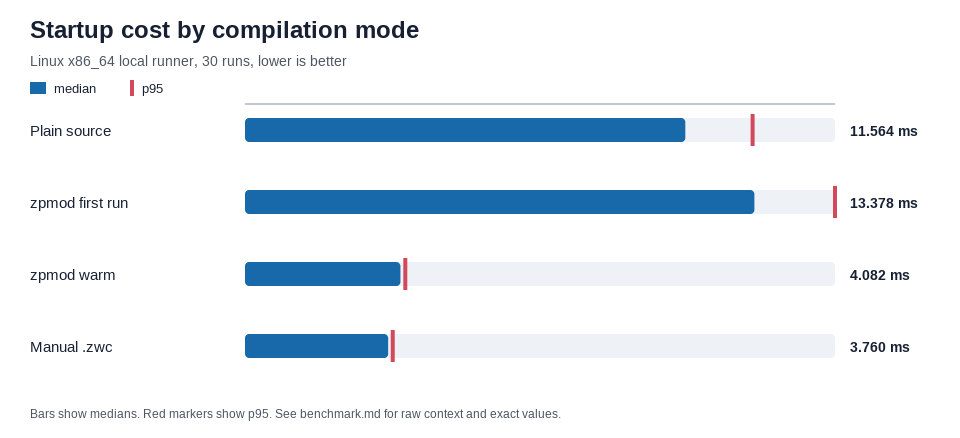
| Mode | Median | p95 |
|---|
| Plain source | 11.564 ms | 13.331 ms |
| zpmod first run | 13.378 ms | 15.495 ms |
| zpmod warm | 4.082 ms | 4.210 ms |
Manual .zwc | 3.760 ms | 3.880 ms |
The v2.0.6 comparison uses one synthetic 40-script workload. The first run includes compilation, the warm run reuses generated `.zwc` files, and manual `.zwc` is the native Zsh control. It is not a universal startup-speed claim. Read the [complete benchmark report](https://github.com/z-shell/zpmod/blob/a2c9e2310f763098ac3f5de186748367d5d17a56/benchmarks/results/v2.0.6-linux-x86_64/benchmark.md) and [benchmark methodology](https://github.com/z-shell/zpmod/blob/a2c9e2310f763098ac3f5de186748367d5d17a56/benchmarks/README.md) for the raw context and reproduction commands.
### Extending Zi reports
```zsh
zpmod [options]
```
Used by zpmod internally to speed up loading plugins with tracking (reporting). It extends the given field {plugin-ID} in `$ZI_REPORTS` hash, with the given string {new-report-body}.
### Debugging
To enable debug messages from the module set:
```zsh
typeset -g ZI_MOD_DEBUG=1
```
### Install zpmod
- Zi
- Standalone
- To start using the module run: `zi module -B`, append `--clean` to run `make distclean`.
- To display the instructions on loading the module, run: `zi module -I`.
```zi
zi module [-B|--build[--clean]] [-I|--info] [-r|--reset] [-h|--help] [options]
zi module -B [--clean] # Build the module, append --clean to run distclean.
zi module -I # Display instructions on loading the module.
zi module -r # Check timestamps and rebuild the module if needed.
```
This command will compile the module and display instructions on what to add to `~/.zshrc`.
Install zpmod as a system package or build it with the repository's CMake helper. Both paths work without Zi or another plugin manager. See the [current standalone installation guide](https://github.com/z-shell/zpmod/blob/main/docs/how-to/install-zpmod-with-cmake.md).
## [z-shell/zgdbm](https://github.com/z-shell/zgdbm)
Provides GDBM module as a plugin.
`zstyles` - The values being set are the defaults.
note
Change the values before loading the `zgdbm` plugin.
~/.zshrc
```zsh
zstyle ":plugin:zgdbm" cppflags "-I/usr/local/include" # Additional include directory
zstyle ":plugin:zgdbm" cflags "-Wall -O2 -g" # Additional CFLAGS
zstyle ":plugin:zgdbm" ldflags "-L/usr/local/lib" # Additional library directory
```
### Install zgdbm
```zi
zi light z-shell/zgdbm
```